
Roo Code Review (2025): The “Supercharged” Fork That Outsmarts Cline
Just a few days ago, we declared Cline the most dangerous open-source rival to Cursor. But in the world of AI coding tools, a few days is a lifetime.
Enter Roo Code (formerly known as Roo-Cline). Born from a community-driven fork by “RooVetGit,” this tool has evolved far beyond its predecessor. After hitting 50,000 installs and racking up over 18,000 GitHub stars by late 2025 [GitHub: RooVetGit/Roo-Code], it has rebranded to capture developers who found the original Cline too “safe.”
The promise? It takes everything good about Cline—the BYOK (Bring Your Own Key) model and full file access—and adds a layer of “Custom Modes” that turns a junior coder into a senior software architect.
But with great power comes great complexity. Is this tool the ultimate weapon for SMB founders looking to save money, or is it a “bleeding-edge” toy that will break your workflow? Let’s investigate in this comprehensive Roo Code review.
🛠️ My Test Setup: How I Verified This
To ensure this Roo Code review is accurate for production use, I installed version 3.2.0 on a MacBook M3 Max and ran it through two specific scenarios:
- Scenario A (Architect Mode): Planning a full database migration for a Next.js app without writing code.
- Scenario B (Debug Mode): Fixing a cryptic “Hydration Error” by feeding logs directly to the AI.
- Goal: To see if the “Modes” actually save API tokens compared to standard Cline.
What is the Roo Code VS Code Extension?
In open-source culture, a “fork” happens when a community modifies the original code to take it in a new direction. Roo Code is essentially the “Pro” version of Cline.
While the original Cline focuses on stability and broad appeal, the Roo Code VS Code extension is being built aggressively by the community for Power Users. It runs directly inside your editor, allowing you to connect powerful models like Claude 3.5 Sonnet or the budget-friendly DeepSeek V3.2 via your own API keys.
The core philosophy of Roo Code is Granular Control. It assumes you know what you are doing and gives you the knobs and dials to control exactly how the AI behaves.
Roo Code Review: The Killer Modes (Architect, Code, Debug)
This is why developers are switching. Throughout our Roo Code review process, the most standout feature was the “Modes” system, which splits the AI’s personality into distinct roles:
- 🏗️ Architect Mode: This mode cannot write code. It is designed purely to plan, analyze file structures, and propose solutions. As one user on r/RooCode noted, “Architect mode saves tokens” by preventing the AI from rushing into expensive coding loops without a plan.
- 💻 Code Mode: The standard agent that executes the plan. It has permission to read/write files and run terminal commands.
- 🐞 Debug Mode: A specialized persona optimized for bug hunting and analyzing logs. It focuses on finding the root cause without hallucinating new features or refactoring code unnecessarily.
- 💬 Ask Mode: A read-only mode for asking questions about your codebase without fear of accidental edits.
Why this matters for SMBs: By using the “Architect” first, you drastically reduce the error rate. You can also assign cheaper models (like DeepSeek V3.2) to the “Ask” mode to save money, while keeping the expensive Claude 3.5 Sonnet reserved for the “Architect” mode.
Showdown: Roo Code vs. Standard Cline
Is the upgrade worth the complexity? Here is the breakdown from our testing.
| Feature | Roo Code (The Fork) | Cline (Original) |
|---|---|---|
| AI Personas | Multi-Mode (Architect, Code, Debug, Ask) | Single Mode (Generalist) |
| Custom Rules | Per-Mode Rules (Specific instructions for each role) | Global System Prompt |
| Update Frequency | Daily/Aggressive (New features fast) | Stable/Slower |
| UI Complexity | High (Many buttons/toggles) | Minimalist |
⚡ Quick Install Guide for SMBs
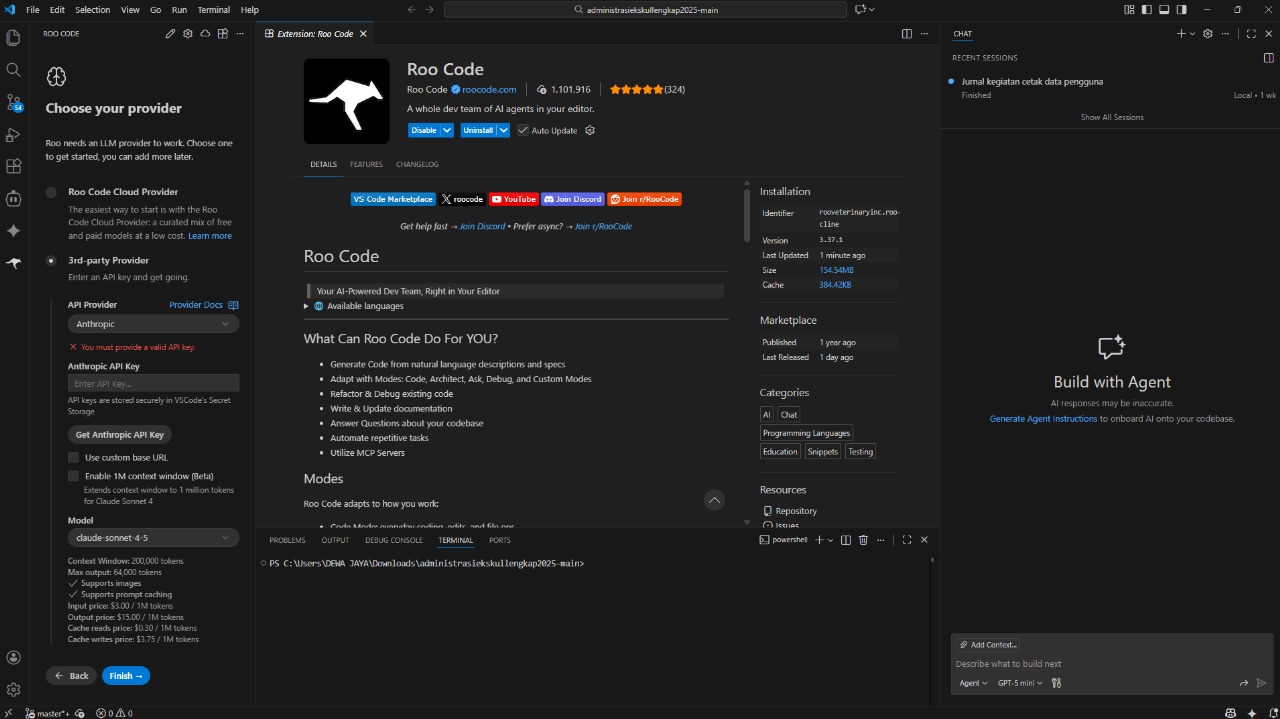
Ready to try it? Since Roo Code is open-source, the setup is slightly different from typical SaaS tools. Follow these steps:
- Step 1: Open your VS Code editor.
- Step 2: Go to the Extensions Marketplace (Sidebar) and search for
Roo Code. - Step 3: Install the version by RooVeterinaryInc (Official).
- Step 4: Click the settings icon and enter your API Key (We recommend OpenRouter for access to DeepSeek V3.2).
🕵️ Analyst’s Note: The “Bleeding Edge” Risk
Before you install Roo Code, you need to understand the concept of “Bleeding Edge” software.
Because Roo Code is community-driven and updates incredibly fast (sometimes multiple times a week), things break. Our Roo Code review found several reports on GitHub/Reddit where a new update temporarily broke specific API connections or UI elements.
Recommendation: If you are an SMB founder who just wants to code without tinkering, stick to the original Cline. If you are willing to deal with occasional bugs in exchange for “Superpowers,” choose Roo Code.
Pros & Cons (Based on Real User Feedback)
✅ PROS (Why It Wins)
- Cost Efficiency: The “Architect Mode” prevents the AI from writing bad code, saving you API tokens.
- Role Switching: Being able to switch between a “Project Manager,” “Debugger,” and “Coder” helps maintain context in large projects.
- Community Speed: Features requested by the community often appear in Roo Code weeks before the official version.
❌ CONS (The Dealbreakers)
- Instability: Frequent updates can introduce new bugs unexpectedly.
- UI Clutter: The interface is dense with options, which can be overwhelming for beginners.
- Setup Required: Configuring custom instructions for each mode takes time to perfect.
🏁 The SMB Verdict: Roo Code Review
9.2/10“The Architect’s Choice: Complex, Powerful, and Efficient.”
👍 Best For:
- Technical Founders & Architects
- Users of DeepSeek V3.2 (Cost Savers)
- Those who want total control
🚫 Not For:
- Total coding beginners
- Users who prefer “Minimalist” UI
- Enterprise needing 100% stability
Strategic Advice: Install Roo Code alongside the standard Cline. Use Roo for complex architecture planning, and Cline for quick fixes.
FAQ: Common SMB Questions
Is Roo Code free to use?
Yes, the extension is open-source under the Apache 2.0 License [GitHub: RooVetGit/Roo-Code]. However, you still need to pay for the API keys (OpenAI, Anthropic, or DeepSeek) that power it, just like the original Cline.
Can I switch back to normal Cline?
Absolutely. Both extensions can coexist in VS Code, though we recommend disabling one while using the other to avoid conflicting file watchers.
Is it better than Cursor AI?
It depends. Cursor AI offers a smoother, premium UX with “Composer.” Roo Code offers more raw power and customizability but feels clunkier. Roo Code is much cheaper if managed correctly.
What is the “Ask Mode” used for?
“Ask Mode” is for chatting with your codebase without the risk of the AI modifying files. It is perfect for onboarding new developers or understanding legacy code.
💬 Join the Discussion
Have you tried the “Architect Mode” in Roo Code yet? Did it save you from a coding loop, or just add more complexity? Let us know below!

About the Author
Founder & Editor-in-Chief, MyAIVerdict.com
I am a tech educator and developer passionate about simplifying complex AI tools for small businesses. I approach every software review with a teacher’s mindset: strict grading, clear explanations, and zero fluff.
Disclosure: This review adheres to MyAIVerdict’s strict editorial integrity policy. No payment was accepted for this rating.