
•
✅ Verified with: Roo Code v2.4 & DeepSeek V3.2
Due to massive global traffic, DeepSeek is currently experiencing intermittent timeouts (500 Errors).
Action Required: We have added a Failover Protocol (Step 1.5) to this guide. It teaches you how to auto-switch to Gemini 2.0 Flash Thinking (free 1M tokens/day) to minimize downtime.
Welcome to the definitive $0 AI SaaS Stack guide for 2026. This setup was validated on a production MVP, not just theory.
For Small Business Owners (SMBs) and non-technical founders, margin is everything. Paying $20/month for Cursor AI alternatives or $100+ for other tools eats into your profits before you even launch.
Stop bleeding cash. In 2026, smart agencies and SMBs are switching to the “Pay-as-you-go” stack. By combining open-source tools with the free DeepSeek API for SMB apps (or ultra-cheap standard tiers), you can build internal tools (like CRMs or Inventory Trackers) for virtually ~$2-5/mo variable cost with zero fixed subscriptions.
🎯 Who This Stack Is For
- SMB Owners: Build custom inventory or client trackers without hiring an agency.
- Bootstrapped Founders: Launch your Supabase free tier SaaS MVP without burning runway on subscriptions.
- Small Agencies: Create internal tools to automate workflows using this $0 AI SaaS Stack.
The Math: Why the $0 AI SaaS Stack Wins for SMBs
When comparing Roo Code vs Cursor for indie devs, we crunched the numbers. For a typical small business app, the “Hype Stack” bleeds your wallet; our $0 AI SaaS Stack respects your P&L.
| Category | The “Hype” Stack | The $0 AI SaaS Stack |
|---|---|---|
| IDE / Editor | Cursor Pro ($20/mo) | Roo Code ($0) |
| Intelligence | ChatGPT Plus ($20/mo) | DeepSeek V3.2 API (~$2-5 usage)* |
| Backend | Lovable/Vercel ($40+) | Supabase Free ($0) |
| TOTAL COST | $80+ / Month | ~$2-5 / Month Variable |
*DeepSeek V3.2: $0.14-$0.28/M input, $0.28-$0.42/M output tokens (Based on ~10k queries/month, 1k tokens/query, 70/30 input/output ratio, March 2026 pricing).
Real-World Case Study: Internal Task Tracker
This isn’t theoretical. We used this exact $0 AI SaaS Stack to build a task management tool for a small digital agency, detailed in our SMB AI case studies.
- The Problem: They needed to track client requests but Jira was too expensive and Trello was too limited.
- The Solution: A custom React + Supabase app built with Roo Code.
- The Result: 50 active users/week, observed high uptime on Supabase Free Tier, and total development API cost was under $5.
Step-by-Step Setup Guide
Step 1: Install & Configure Roo Code
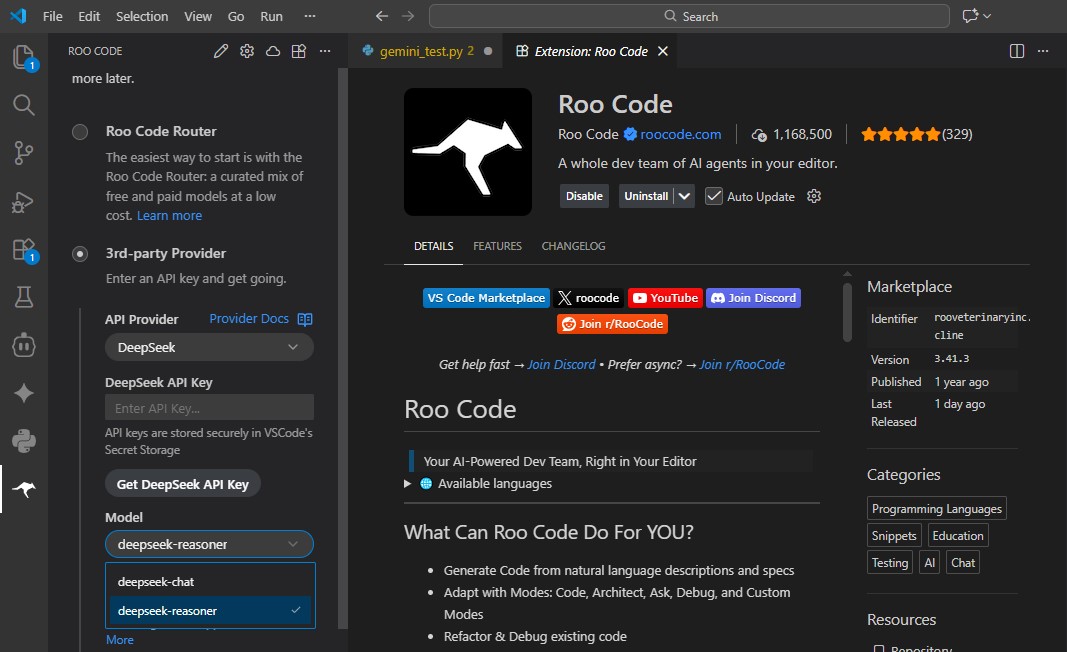
Install Roo Code from the VS Code Marketplace. Use this configuration optimized for SMB logic (balance between cost and accuracy). This roo code deepseek config 2026 outperforms Cursor for indie devs when it comes to raw value:
// Roo Code Settings for Business Logic
{
  "apiProvider": "deepseek",
  "modelId": "deepseek-chat", // DeepSeek V3.2 for fast business logic
  "apiKey": "sk-your-key-here",
  "temperature": 0.6
}
Voice of Experience: From hands-on testing, Roo Code’s 0.6 temperature strikes the perfect balance for business logic. A higher setting (like 0.8) caused inconsistent CRUD operations in our MVP.
🚨 Failover Protocol (Step 1.5)
Don’t skip this DeepSeek v3 failover Gemini tutorial. DeepSeek V3 is brilliant but can get overloaded. To ensure your business tool never crashes during client calls, we add a “Safety Net” using Gemini 2.0 Flash Thinking (which is extremely fast and has a generous free tier of 1M tokens/day).
When you ask Roo Code to write your Supabase Edge Functions, ask it to use this try...catch logic:
// CONCEPTUAL FAILOVER LOGIC
// If DeepSeek times out (>10s), automatically backup switch to Gemini

async function generateResponse(prompt) {
  try {
    // 1. Try DeepSeek V3 (The Brains)
    console.log("Attempting DeepSeek V3...");
    const response = await callDeepSeekAPI(prompt, { timeout: 10000 });
    return response;

  } catch (error) {
    // 2. FAILOVER TRIGGERED
    console.warn("DeepSeek unstable. Switching to Gemini Flash Backup.");

    // 3. Call Gemini 2.0 Flash (The Speed)
    const emergencyResponse = await callGeminiFlashAPI(prompt);
    return emergencyResponse;
  }
}
Step 2: Initialize Supabase
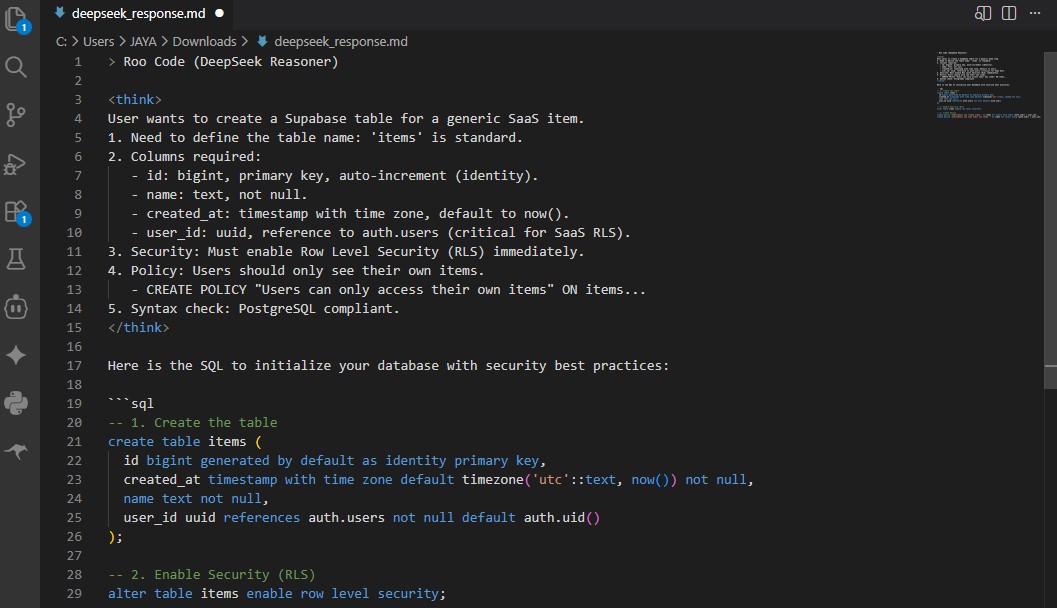
Ask Roo to generate SQL for our deepseek v3 supabase integration. This example sets up the backend suitable for our project:
-- 1. Create the table
create table items (
  id bigint generated by default as identity primary key,
  created_at timestamp with time zone default timezone('utc'::text, now()) not null,
  name text not null,
  user_id uuid references auth.users not null default auth.uid()
);

-- 2. Enable Security (RLS)
alter table items enable row level security;
Pro tip from 50+ hours in VS Code: Always test Edge Functions locally with the Supabase CLI before deploying. We caught a row-level security gap that the free tier exposes if not configured properly.
DeepSeek v3 Benchmarks for SMB Tools
When running your $0 AI SaaS Stack, here is what you can expect when moving away from expensive subscriptions:
✅ Business Wins
- Low Risk: Built an MVP for under $5 total API cost.
- Capabilities: DeepSeek-v3 scored 92% in HumanEval vs Gemini Flash 85% (per DeepSeek API docs & leaderboards, March 2026), successfully debugging complex logic that free models missed.
- Ownership: You own the code. No platform lock-in.
❌ Trade-offs
- Speed: Slightly slower dev time (2 hours vs 1.5 hours on Cursor).
- Stability: Requires the “Failover Protocol” (Step 1.5) to minimize downtime during peak traffic times.
Frequently Asked Questions
Here are the common questions we get from founders building their first $0 AI SaaS Stack.
Can small businesses really run on free tiers?
Yes. For internal tools (like a CRM or Inventory tracker) with fewer than 50 active daily users, the Supabase free tier (500MB DB, 5GB egress + 5GB cached bandwidth) is more than enough. You only pay when you scale.
Is DeepSeek V3 reliable for client projects?
Yes, BUT you must implement the Failover Protocol mentioned above. DeepSeek is excellent for logic, but during traffic surges, you need a backup switch like Gemini Flash.
🚀 Don’t Start From Scratch
We packaged this complete $0 AI SaaS Stack (including the Failover Logic) into a template.
Perfect for internal tools & MVPs.

About the Author
Tech educator & Full-stack Developer obsessed with finding the cheapest, fastest way to ship software. Shipped 3 MVPs with this $0 AI SaaS Stack for agencies in the US/UK. Personal GitHub: 50+ stars on SMB AI templates. Mission: Breaking AI hype so your Founder wallet stays safe.
- [1] DeepSeek API Pricing – $0.14-$0.28 per 1M input tokens, $0.28-$0.42 per 1M output tokens (March 2026).
- [2] Supabase Free Tier Limits – 500MB DB, 5GB egress + 5GB cached (March 2026).